Quickstart Tutorial
galtab is a general approach for calculating the expectation value of counts-in-cells statistics for a given halo catalog and HOD model. It pretabulates placeholder galaxies inside each halo to yield rapid, deterministic results, which is ideal for MCMC likelihood evaluations.
This tutorial will demonstrate some basic Counts-in-Cylinders (CiC) calculations using the intended galtab workflow.
To cite galtab, learn more implementation details, and explore an example science use case, check out https://arxiv.org/abs/2309.08675.
Prerequisites
All of the following are pip installable
galtabnumpyjaxastropyhalotools
matplotlibjupyterlab
After installing the above and downloading the bolplanck z=0 halotools catalog, you should be able to run the following cell. In this cell:
set our cosmology and CiC parameters
choose an HOD model
load the simulation data
[1]:
import numpy as np
import matplotlib.pyplot as plt
import jax

from astropy import cosmology
import halotools.empirical_models as htem
import halotools.sim_manager as htsm
import halotools.mock_observables as htmo

import galtab
[2]:
# Download an example halotools catalog
htsm.DownloadManager().download_processed_halo_table(
    'bolplanck', 'rockstar', 0.0)
... Downloading data from the following location:
http://www.astro.yale.edu/aphearin/Data_files/halo_catalogs/bolplanck/rockstar/hlist_1.00231.list.halotools_v0p4.hdf5

 ... Saving the data with the following filename:
/home/docs/.astropy/cache/halotools/halo_catalogs/bolplanck/rockstar/hlist_1.00231.list.halotools_v0p4.hdf5

5% complete, elapsed time = 1 seconds
10% complete, elapsed time = 1 seconds
15% complete, elapsed time = 2 seconds
20% complete, elapsed time = 2 seconds
25% complete, elapsed time = 3 seconds
30% complete, elapsed time = 3 seconds
35% complete, elapsed time = 3 seconds
40% complete, elapsed time = 4 seconds
45% complete, elapsed time = 4 seconds
50% complete, elapsed time = 5 seconds
55% complete, elapsed time = 5 seconds
60% complete, elapsed time = 6 seconds
65% complete, elapsed time = 6 seconds
70% complete, elapsed time = 7 seconds
75% complete, elapsed time = 7 seconds
80% complete, elapsed time = 8 seconds
85% complete, elapsed time = 8 seconds
90% complete, elapsed time = 8 seconds
95% complete, elapsed time = 9 seconds
100% complete, elapsed time = 9 seconds

Total runtime to download pre-processed halo catalog = 9.4 seconds


The halo catalog has been successfully downloaded to the following location:
/home/docs/.astropy/cache/halotools/halo_catalogs/bolplanck/rockstar/hlist_1.00231.list.halotools_v0p4.hdf5

This filename and its associated metadata have also been added to the Halotools cache log,
as reflected by a newly added line to the following ASCII file:

/home/docs/.astropy/cache/halotools/halo_table_cache_log.txt

Since the catalog will now be recognized in cache,
you can load it into memory using the following syntax:

>>> from halotools.sim_manager import CachedHaloCatalog
>>> halocat = CachedHaloCatalog(simname = 'bolplanck', halo_finder = 'rockstar', version_name = 'halotools_v0p4', redshift = -0.0023)

For convenience, you can set this catalog to be your default catalog
and omit the CachedHaloCatalog constructor arguments.
To do that, change the following variables in the
halotools.sim_manager.sim_defaults module:
``default_simname``, ``default_halo_finder``, ``default_version_name`` and ``default_redshift``.

Tabular data storing the actual halos is bound to the ``halo_table``
attribute of ``halocat`` in the form of an Astropy Table:

>>> halos = halocat.halo_table

Halo properties are accessed in the same manner as a python dictionary or Numpy structured array:

>>> mass_array = halos['halo_mvir']

The ``halocat`` object also contains additional metadata
such as ``halocat.simname``, ``halocat.redshift`` and ``halocat.fname``
that you can use for sanity checks on your bookkeeping.

Note that if you move this halo catalog into a new location on disk,
you must update both the ``fname`` metadata of the hdf5 file
as well as the``fname`` column of the corresponding entry in the log.
You can accomplish this with the ``update_cached_file_location``method
of the HaloTableCache class.
[3]:
# Set our CiC parameters (all lengths are in Mpc/h)
proj_search_radius = 2.0
cylinder_half_length = 10.0
cic_edges = np.arange(-0.5, 16)

# Set our cosmology and HOD model
cosmo = cosmology.Planck13
hod = htem.PrebuiltHodModelFactory("zheng07", threshold=-21)

# Load Bolshoi-Planck simulation halos at z=0
halocat = htsm.CachedHaloCatalog(simname="bolplanck", redshift=0)
halocat.halo_table[:5]
[3]:
| halo_vmax_firstacc | halo_dmvir_dt_tdyn | halo_macc | halo_scale_factor | halo_vmax_mpeak | halo_m_pe_behroozi | halo_delta_vmax_behroozi17 | halo_xoff | halo_spin | halo_tidal_force | halo_scale_factor_firstacc | halo_c_to_a | halo_mvir_firstacc | halo_scale_factor_last_mm | halo_tidal_id | halo_scale_factor_mpeak | halo_pid | halo_m500c | halo_id | halo_halfmass_scale_factor | halo_upid | halo_t_by_u | halo_rvir | halo_vpeak | halo_dmvir_dt_100myr | halo_mpeak | halo_m_pe_diemer | halo_jx | halo_jy | halo_jz | halo_m2500c | halo_mvir | halo_voff | halo_axisA_z | halo_axisA_x | halo_axisA_y | halo_y | halo_b_to_a | halo_x | halo_z | halo_m200b | halo_vacc | halo_scale_factor_lastacc | halo_vmax | halo_m200c | halo_vx | halo_vy | halo_vz | halo_dmvir_dt_inst | halo_tidal_force_tdyn | halo_rs | halo_nfw_conc | halo_hostid | halo_mvir_host_halo |
|---|---|---|---|---|---|---|---|---|---|---|---|---|---|---|---|---|---|---|---|---|---|---|---|---|---|---|---|---|---|---|---|---|---|---|---|---|---|---|---|---|---|---|---|---|---|---|---|---|---|---|---|---|---|
| float32 | float32 | float32 | float32 | float32 | float32 | float32 | float32 | float32 | float32 | float32 | float32 | float32 | float32 | int64 | float32 | int64 | float32 | int64 | float32 | int64 | float32 | float32 | float32 | float32 | float32 | float32 | float32 | float32 | float32 | float32 | float32 | float32 | float32 | float32 | float32 | float32 | float32 | float32 | float32 | float32 | float32 | float32 | float32 | float32 | float32 | float32 | float32 | float32 | float32 | float32 | float32 | int64 | float32 |
| 1001.57 | 12810.0 | 200800000000000.0 | 1.00231 | 1001.57 | 202700000000000.0 | -0.0026 | 0.0257357 | 0.02391 | 0.11954 | 1.00231 | 0.47559 | 200800000000000.0 | 0.28343 | 2812606193 | 1.002 | -1 | 116580000000000.0 | 2811042639 | 0.41506 | -1 | 0.593 | 1.190447 | 1091.38 | 17390.0 | 200800000000000.0 | 111800000000000.0 | 2536000000000000.0 | -474400000000000.0 | -6566000000000000.0 | 65777000000000.0 | 200800000000000.0 | 21.34 | 19.2231 | 59.7891 | -18.8001 | 43.14082 | 0.63663 | 36.17984 | 17.96339 | 223780000000000.0 | 1001.57 | 1.00231 | 1001.57 | 158240000000000.0 | 16.1 | 8.51 | -78.88 | 17390.0 | 0.12244 | 0.137953 | 8.629367 | 2811042639 | 200800000000000.0 |
| 895.2 | 13760.0 | 179600000000000.0 | 1.00231 | 895.2 | 181000000000000.0 | -0.01065 | 0.041987 | 0.06297 | 0.50587 | 1.00231 | 0.56181 | 179600000000000.0 | 0.29862 | 2811077105 | 1.002 | -1 | 100360000000000.0 | 2811055606 | 0.50618 | -1 | 0.627 | 1.146849 | 969.05 | 7324.0 | 179600000000000.0 | 128700000000000.0 | 1.074e+16 | 4931000000000000.0 | -1.185e+16 | 47026000000000.0 | 179600000000000.0 | 41.91 | 41.2062 | 34.6803 | 17.8882 | 49.54417 | 0.8397 | 45.36644 | 40.01593 | 204460000000000.0 | 895.2 | 1.00231 | 895.2 | 142290000000000.0 | 2.46 | 264.77 | -128.08 | 7324.0 | 0.491 | 0.185805 | 6.172326 | 2811055606 | 179600000000000.0 |
| 853.83 | 4666.0 | 129800000000000.0 | 1.00231 | 853.83 | 149500000000000.0 | 0.00531 | 0.026461901 | 0.03607 | 0.07568 | 1.00231 | 0.66381 | 129800000000000.0 | 0.49606 | 2810630242 | 1.002 | -1 | 87766000000000.0 | 2809250167 | 0.491 | -1 | 0.5774 | 1.029343 | 926.37 | 2747.0 | 129800000000000.0 | 80320000000000.0 | 2133000000000000.0 | -3236000000000000.0 | -3111000000000000.0 | 39496000000000.0 | 129800000000000.0 | 23.35 | -17.5268 | 38.9596 | 24.3626 | 13.88261 | 0.76149 | 22.02318 | 9.80153 | 141210000000000.0 | 853.83 | 1.00231 | 853.83 | 112010000000000.0 | 18.49 | 124.89 | -35.19 | 2747.0 | 0.10074 | 0.119293995 | 8.628624 | 2809250167 | 129800000000000.0 |
| 777.64 | 4401.0 | 103000000000000.0 | 1.00231 | 777.64 | 104800000000000.0 | 0.00498 | 0.0516998 | 0.05031 | 0.09677 | 1.00231 | 0.47302 | 103000000000000.0 | 0.38469 | 2820592816 | 1.002 | -1 | 57781000000000.0 | 2809483946 | 0.65806 | -1 | 0.6152 | 0.952978 | 831.17 | 2747.0 | 103000000000000.0 | 64200000000000.0 | 1713000000000000.0 | -1488000000000000.0 | 4582000000000000.0 | 30529000000000.0 | 103000000000000.0 | 98.45 | 24.7744 | -10.3568 | 38.9949 | 36.67881 | 0.7881 | 12.29788 | 34.18085 | 115110000000000.0 | 777.64 | 1.00231 | 777.64 | 82069000000000.0 | -281.37 | -115.39 | -391.28 | 2747.0 | 0.10259 | 0.132334 | 7.201309 | 2809483946 | 103000000000000.0 |
| 748.56 | 11480.0 | 99470000000000.0 | 1.00231 | 748.56 | 107600000000000.0 | 0.05989 | 0.0779697 | 0.0348 | 0.12465 | 1.00231 | 0.47409 | 99470000000000.0 | 0.63275 | 2809483946 | 1.002 | -1 | 59100000000000.0 | 2809272603 | 0.63781 | -1 | 0.67 | 0.941893 | 748.56 | 5218.0 | 99470000000000.0 | 70970000000000.0 | 1207000000000000.0 | -2126000000000000.0 | -2677000000000000.0 | 26267000000000.0 | 99470000000000.0 | 118.79 | 29.2183 | 52.7796 | 6.18836 | 26.12877 | 0.66155 | 10.66037 | 22.5009 | 108110000000000.0 | 748.56 | 1.00231 | 748.56 | 84337000000000.0 | -43.87 | 292.95 | -171.47 | 5218.0 | 0.1579 | 0.14077 | 6.691006 | 2809272603 | 99470000000000.0 |
Calculate CiC the standard way with halotools
Populate the halocat with galaxies probabilistically from the HOD model
Compute the number of neighbors within a cylinder around each neighbor
Tally up a histogram of the neighbor counts for a given set of CiC bins
[4]:
# Choose your HOD parameters (in this case, we will keep them the same)
hod.param_dict.update({})

# Populated model galaxies and get their Cartesian coordinates
hod.populate_mock(halocat, seed=0)
galaxies = hod.mock.galaxy_table
xyz = htmo.return_xyz_formatted_array(
    galaxies["x"], galaxies["y"], galaxies["z"], velocity=galaxies["vz"],
    velocity_distortion_dimension="z", period=halocat.Lbox, cosmology=cosmo
)

# Compute CiC (self-counting subtracted by the `-1`)
cic_counts = htmo.counts_in_cylinders(
    xyz, xyz, proj_search_radius, cylinder_half_length,
    period=halocat.Lbox) - 1
cic_halotools = np.histogram(cic_counts, bins=cic_edges, density=True)[0]
cic_halotools
[4]:
array([0.35818234, 0.24693701, 0.15634167, 0.09105551, 0.05619787,
       0.03474259, 0.0190394 , 0.01392005, 0.01035375, 0.00500431,
       0.00270348, 0.00155306, 0.00126546, 0.0013805 , 0.00063273,
       0.00069025])
Now let’s do it the galtab way
[5]:
# Give the Tabulator the halo catalog and a fiducial HOD model
gtab = galtab.GalaxyTabulator(halocat, hod)

# Prepare the CICTabulator to make predictions
cictab = galtab.CICTabulator(gtab, proj_search_radius, cylinder_half_length,
                            bin_edges=cic_edges)

# Choose your HOD parameters (in this case, we will keep them the same)
hod.param_dict.update({})

# Predict CiC for this model
cic_galtab = cictab.predict(hod)
cic_galtab
[5]:
Array([0.35875157, 0.25464624, 0.15486689, 0.09135279, 0.05421961,
       0.03248107, 0.01915211, 0.01244971, 0.00771107, 0.00501356,
       0.0033694 , 0.00225268, 0.00150615, 0.00102266, 0.00068709,
       0.00051736], dtype=float32)
Optionally, write the CIC tabulation to disk for later use:
[6]:
# Pickle the CICTabulator - creates a large file named `cictab.pickle`:
cictab.save("cictab.pickle")

# And load it back with:
cictab = galtab.CICTabulator.load("cictab.pickle")
gtab = cictab.galtabulator
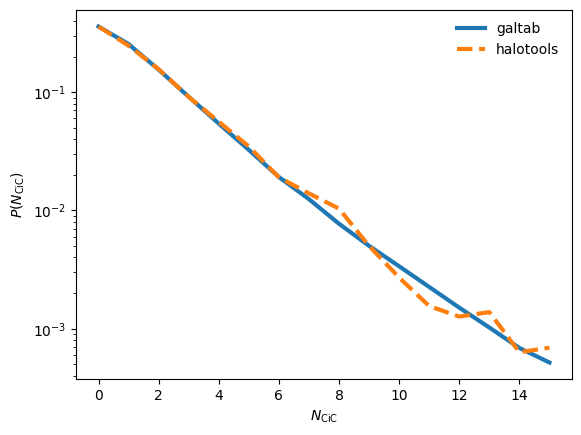
Plot the galtab vs. halotools comparison
galtabpredicts the CiC expectation value (smooth + deterministic)halotoolsdraws a CiC realization (noisy + stochastic)
[7]:
cic_cens = 0.5 * (cic_edges[:-1] + cic_edges[1:])
plt.semilogy(cic_cens, cic_galtab, label="galtab", lw=3)
plt.semilogy(cic_cens, cic_halotools, label="halotools", lw=3, ls="--")
plt.legend(frameon=False)
plt.xlabel("$N_{\\rm CiC}$")
plt.ylabel("$P(N_{\\rm CiC})$")
plt.show()
In Development: Differentiate CiC w.r.t. the HOD parameter \(\log M_{\rm min}\)
galtab is implemented in JAX, so it is portable to GPU and differentiable (in principal), assuming your HOD model is compatible with JAX. Unfortunately, this requires a few modifications to halotools models. For example, let’s use the JaxZheng07Cens and JaxZheng07Sats models, originally implemented for the JaxTabCorr project.
We can construct a composite HOD model with our JAX-compatible mean occupation functions, which we call hod_jax. This model allows us to differentiate cictab.predict with jax.grad.
Note: You shouldn’t try using jax.jit directly on cictab.predict, since it contains some lines of code that can’t be compiled. Rest assured that the primary expensive computations will automatically compile and run on the GPU if available.
[8]:
from galtab.jaxhalotools import JaxZheng07Cens, JaxZheng07Sats

# Create JAX-compatible composite HOD model
def make_hod_jax():
    return htem.HodModelFactory(
        centrals_occupation=JaxZheng07Cens(threshold=-21),
        satellites_occupation=JaxZheng07Sats(threshold=-21),
        centrals_profile=htem.TrivialPhaseSpace(),
        satellites_profile=htem.NFWPhaseSpace()
    )

# Define function that predictions P(N_cic = 1)
def calc_cic1(logMmin=12.79):
    hod_jax = make_hod_jax()
    hod_jax.param_dict.update({"logMmin": logMmin})
    return cictab.predict(hod_jax, warn_p_over_1=False)[1]

# Define the derivative of calc_cic1
diff_cic1 = jax.grad(calc_cic1)

# Note that we shouldn't make logMmin too much lower than that of our fiducial
# model. If desired, make more conservative choices for the fiducial parameters.
# i.e., low logMmin / logM1 / logM0 values and large sigma_logM values
for logmmin in np.linspace(11.0, 15.0, 20):
    value = calc_cic1(logmmin)
    derivative = diff_cic1(logmmin)

    plt.plot(logmmin, value, "bo")
    plt.quiver(logmmin, value, 1, derivative, angles="xy")

plt.xlabel("$\\log M_{\\rm min}$")
plt.ylabel("$P(N_{\\rm CiC} = 1)$")
plt.show()
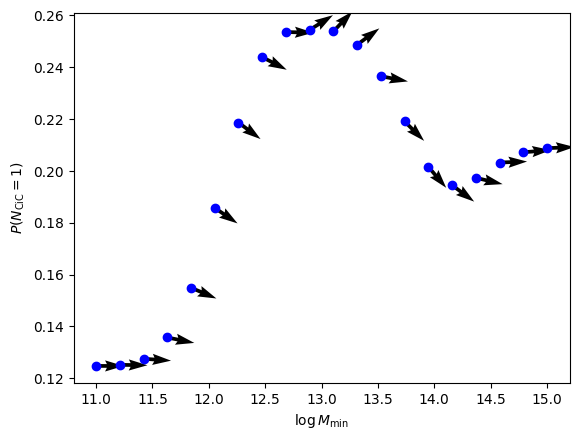
jax.grad (the arrows in the above plot) isn’t working yet…
I actually wasn’t expecting the above to work perfectly, because it’s using the Monte-Carlo mode, which isn’t perfectly continuous
But analytic mode moment derivatives aren’t working either…
TODO: Figure out what’s going wrong